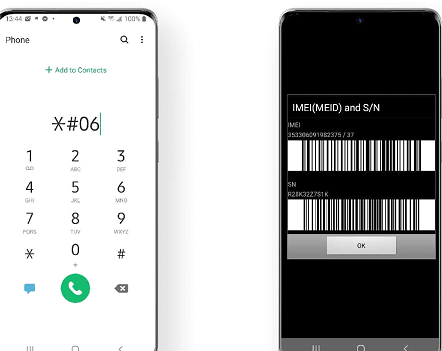
Every mobile phone has a unique identifier that helps distinguish it from millions of other devices worldwide. If you’ve recently purchased a Samsung smartphone, are verifying a second-hand device, or need information for support purposes, you may search for Samsung IMEI lookup. Understanding what an IMEI number is, how to locate it, and how lookup services work can help you verify important information about your device while protecting your personal data.What Is an IMEI Number?IMEI stands for International Mobile Equipment Identity. It is a unique numerical identifier assigned to mobile devices that connect to cellular networks.Manufacturers and mobile carriers use IMEI numbers to help identify individual devices.An IMEI number may be used for purposes such as:Device identificationWarranty supportCarrier activationLost or stolen device reportingTechnical supportEach compatible cellular device has its own unique IMEI.What Is a Samsung IMEI Lookup?A Samsung IMEI lookup is the process of checking information associated with a Samsung device using its IMEI number.Depending on the service being used, available information may include:Device modelStorage capacityColorManufacturing informationWarranty status (through authorized sources where available)Carrier compatibilityNetwork lock status (when supported)The information available varies depending on the lookup service and applicable manufacturer or carrier policies.Why Perform an IMEI Lookup?People perform IMEI lookups for several reasons.Verify a Used PhoneWhen purchasing a pre-owned Samsung device, an IMEI lookup may help confirm that the device matches its advertised model.Confirm Device SpecificationsA lookup can sometimes verify details such as:Model numberDevice variantOriginal storage configurationTechnical SupportSupport representatives may request your IMEI number to assist with troubleshooting or warranty inquiries.Warranty InformationSome manufacturer or carrier services allow users to check warranty eligibility using device information.How to Find Your Samsung IMEI NumberThere are several ways to locate your device’s IMEI.Dial a USSD CodeMany Samsung phones display the IMEI after entering:*#06#The number usually appears automatically on the screen.Device SettingsYou can often find the IMEI by navigating to:SettingsAbout PhoneStatus or Device InformationMenu names may vary slightly depending on the software version.Device PackagingThe original retail box may include the IMEI on its product label.SIM Tray or Device LabelSome Samsung models display the IMEI on the SIM tray or another physical label.Information You Should Keep PrivateAlthough the IMEI itself is not the same as sensitive financial information, it is still unique to your device.To help protect your device:Share the IMEI only when necessary.Use official support channels.Avoid posting your IMEI publicly.Verify the legitimacy of websites requesting your device information.Protecting device identifiers supports better security.Choosing a Reliable IMEI Lookup ServiceWhen selecting an IMEI lookup service, consider:Official SourcesWhenever possible, use Samsung’s official support resources or your mobile carrier.Secure WebsitesLook for HTTPS encryption before entering device information.Privacy PoliciesReview how your information will be handled.Clear Contact InformationLegitimate services generally provide customer support and company details.Benefits of IMEI VerificationChecking your IMEI may provide several advantages.Device AuthenticationConfirming the model information may help verify that the device matches the advertised specifications.Better Purchase DecisionsBuyers of second-hand devices can gather additional information before completing a purchase.Easier Technical SupportHaving your IMEI available can simplify communication with support representatives.Warranty AssistanceSome support services use IMEI numbers to identify eligible devices.IMEI and Lost DevicesThe IMEI can also play a role if a device is lost or stolen.Depending on local regulations and carrier policies, the IMEI may assist with:Reporting a lost phoneCarrier supportDevice identificationProcedures vary by country, carrier, and applicable laws.Tips for Protecting Your Samsung DeviceGood security practices include:Enable screen lock protection.Use biometric authentication where available.Keep software updated.Enable device location features if supported.Record your IMEI in a secure location.These habits help improve device security.The Future of Mobile Device IdentificationMobile technology continues evolving with stronger security features.Emerging developments include:Enhanced device authenticationImproved anti-theft protectionsStronger privacy controlsBetter remote device managementIntegrated hardware securityManufacturers continue investing in technologies that improve both security and user convenience.FAQsWhat is a Samsung IMEI lookup?A Samsung IMEI lookup is the process of checking information associated with a Samsung mobile device using its unique IMEI number.How do I find my Samsung IMEI?You can often find it by dialing *#06#, checking your phone’s Settings menu, reviewing the original packaging, or examining the device label on certain models.Is it safe to share my IMEI?Only share your IMEI with trusted organizations such as Samsung, your mobile carrier, or authorized service providers when necessary. Avoid publishing it publicly.Can an IMEI lookup verify a used phone?An IMEI lookup may help confirm certain device details such as the model and specifications. The available information depends on the lookup service used.Why is the IMEI important?The IMEI uniquely identifies a mobile device and may be used for warranty support, technical assistance, device identification, and carrier-related services.ConclusionA Samsung IMEI lookup is a useful way to verify important information about your smartphone, especially when purchasing a used device or seeking technical support. By learning how to locate your IMEI, using reputable lookup services, and protecting your device information, you can better understand your Samsung phone while maintaining good security practices. For warranty questions or detailed device information, official Samsung support and your mobile carrier remain the most reliable sources.