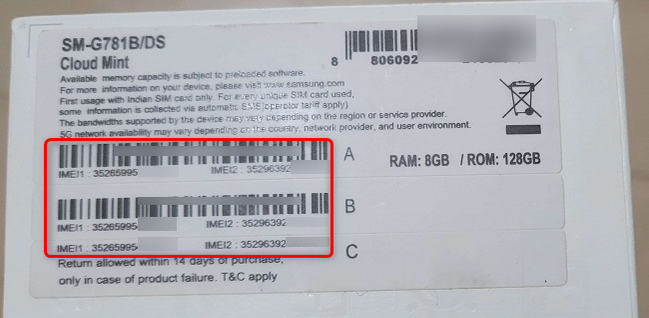
Every Samsung smartphone includes a unique identification number that helps distinguish it from millions of other mobile devices. Whether you need technical support, want to verify a device before purchasing it, or require information for warranty purposes, knowing how to complete a Samsung find IMEI process is extremely useful. Samsung provides several easy ways to locate your IMEI number, making it accessible whenever you need it while helping you manage your device more effectively.What Is an IMEI Number?IMEI stands for International Mobile Equipment Identity.It is a unique numerical identifier assigned to mobile devices that connect to cellular networks.Unlike your phone number, the IMEI identifies the physical device itself rather than your mobile account.Mobile carriers and manufacturers use IMEI numbers for purposes such as:Device identificationTechnical supportWarranty verificationNetwork activationLost or stolen device reportingEach compatible Samsung phone has its own unique IMEI.Why the IMEI Is ImportantYour IMEI serves several legitimate purposes throughout the life of your device.It may be used to:Verify your phone model.Request technical support.Confirm warranty eligibility.Identify a device before purchasing it second-hand.Assist with reporting a lost or stolen phone.Because the IMEI uniquely identifies your device, it should be protected like other important device information.How to Find the IMEI on a Samsung PhoneSamsung provides several methods for locating your IMEI.Dial *#06#The quickest method is opening the Phone application and dialing:*#06#The IMEI number usually appears automatically on the screen.Use the Settings AppYou can also locate your IMEI through your phone’s settings.Typical steps include:Open Settings.Tap About Phone.View the IMEI information displayed.The exact menu names may vary depending on your Samsung model and software version.Check the Original PackagingMany Samsung phones include the IMEI number on the label attached to the original retail box.Inspect the SIM TraySome Samsung models have the IMEI printed on the SIM tray or another physical label on the device.The location depends on the model.When You May Need Your IMEIThere are several situations where your IMEI may be requested.Warranty SupportAuthorized Samsung service centers may request your IMEI when processing warranty inquiries.Technical AssistanceSupport representatives sometimes use the IMEI to identify the exact device model.Buying or Selling a PhoneThe IMEI can help verify that the device matches its advertised specifications.Carrier ServicesMobile carriers may request the IMEI during activation or troubleshooting.Samsung Phones with Dual SIMMany Samsung smartphones support two SIM cards.These devices often include:IMEI 1IMEI 2Each SIM slot typically has its own unique IMEI.This allows each cellular connection to be identified separately.IMEI vs. Serial NumberAlthough both identify your phone, they serve different purposes.IMEIIdentifies the cellular hardware.Used by mobile carriers.Supports network-related functions.Serial NumberIdentifies the individual device.Used mainly by Samsung for manufacturing and warranty purposes.Both numbers may be useful during customer support interactions.Keeping Your IMEI SecureAlthough the IMEI does not directly provide access to your personal accounts, it remains unique to your device.For better security:Share your IMEI only when necessary.Use official Samsung support channels.Avoid posting screenshots showing your IMEI online.Verify websites before entering device information.Protecting your device information helps reduce unnecessary risks.Tips for Buying a Used Samsung PhoneIf purchasing a second-hand Samsung device:Verify the IMEI matches the phone.Confirm the model number.Inspect the device carefully.Purchase from reputable sellers.Request proof of purchase if available.These steps support a more informed buying decision.Additional Samsung Security TipsIn addition to protecting your IMEI:Enable Face Recognition or Fingerprint Unlock where available.Use a strong screen lock.Keep your software updated.Enable Find My Device if supported.Record your IMEI in a secure location.These habits help improve overall device security.The Future of Mobile Device SecuritySmartphone security continues advancing through innovations such as:Enhanced anti-theft protectionImproved hardware encryptionBetter identity verificationStronger account securityAdvanced device managementManufacturers continue improving mobile security while maintaining compatibility with carrier networks.FAQsWhat is Samsung Find IMEI?Samsung Find IMEI refers to the process of locating your Samsung phone’s unique IMEI number using methods such as dialing *#06#, checking device settings, or reviewing the original packaging.How do I find my Samsung IMEI quickly?The fastest method is dialing *#06# using the Phone app. The IMEI should appear immediately on the display.Why is my IMEI important?The IMEI identifies your device for warranty support, technical assistance, carrier services, and device verification.Can a Samsung phone have two IMEI numbers?Yes. Many dual SIM Samsung smartphones include two IMEI numbers, one for each SIM slot.Should I share my IMEI publicly?No. While the IMEI does not provide direct access to your accounts, it is still unique to your device and should only be shared with trusted organizations when necessary.ConclusionCompleting a Samsung find IMEI process is simple and can be extremely helpful when registering your phone, requesting technical support, verifying a used device, or checking warranty information. Samsung provides several convenient methods for locating the IMEI, including dialing *#06# and viewing the information through your device settings. By keeping your IMEI secure and using official Samsung resources whenever possible, you can better protect your smartphone while ensuring you have the information needed whenever support or verification is required.